In classic Morbus the only things you could pick up were weapons and ammo. Utility items like Medkits, glowsticks, grenades, etc, were essentially just weapons as well. This was simple and it was how things typically worked in Garry’s Mod at the time.
In this iteration of Morbus I wanted more flexibility; what if not every item is a weapon? Therefore I’ve created an Item System.
Items
This system is based off of what i’ve learned from working on my preivous game Shoothouse. It worked pretty well and so I’m using a similiar system for Morbus. Let’s dive into how it works:
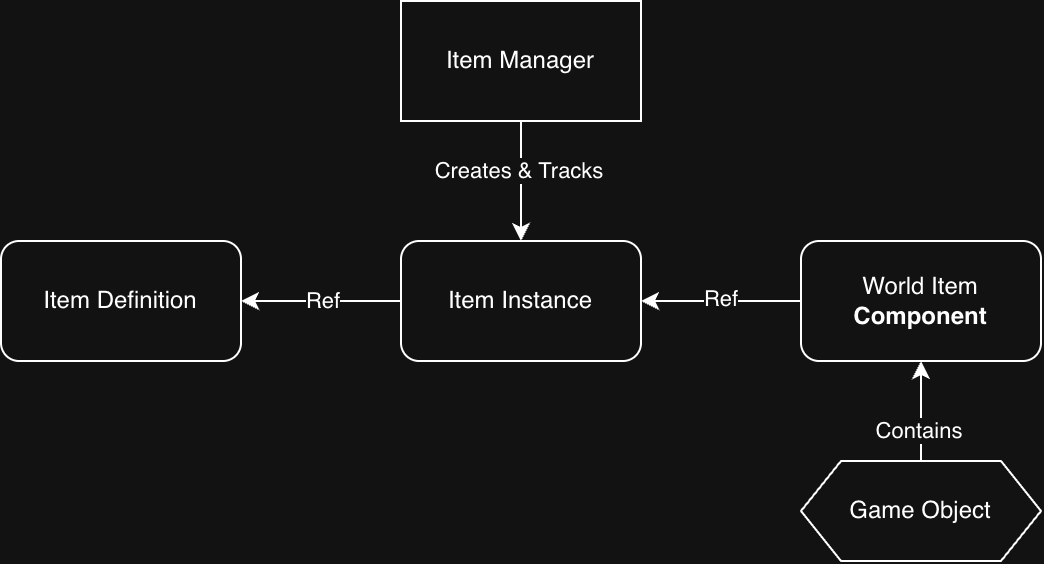
There are four major parts of this item system;
Item Definition
This describes what an item is, you can think of it as the template or archetype of any given item. It contains things like:
- The unique identifier for this type of item
- I use strings, and call it a “classname” ie “Item Class Name”
- The user-friendlyname of the item ie “Display Name”
- The Icon that represents this item
- The 3D model that represents this item
Since all of these attributes would be the same across all types of items, they’re stored inside of the item definition.
I also have derived ItemDefinition types, for instance I have an FirearmItemDefinition which describes things like a firearm’s damage, RPM, etc.
There’s a Items.Definitions.cs file in my codebase where I define all the items in code, via a helper builder class I made, it looks like this:
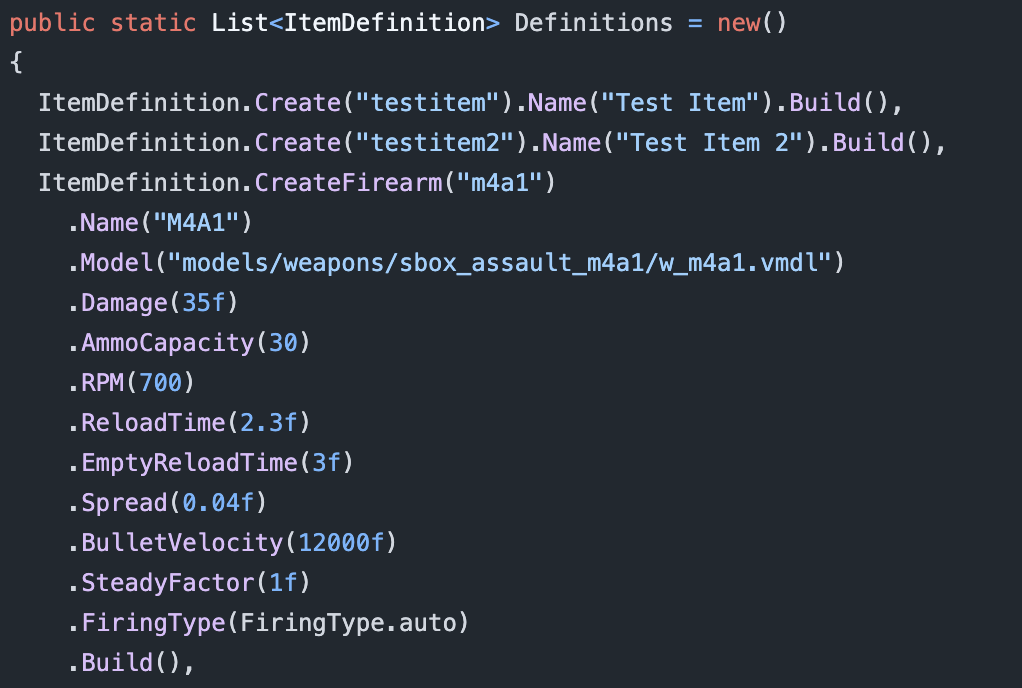
This way I can do Items.GetDefinitionOf(“someitemclass”) anywhere and it will give me the definition of this item.
I include firearm stats in the item definition for two reasons
- If I ever need to query the stats of a firearm item, they are already inside of the item definition
- This assumes all firearms of a type have the same stats
- All firearms that get created via item (more on this later) have their stats copied from the item definition into the firearm itself
- I can look at all firearm stats in one place (and in code!), making it easier to update and balance them
Item Instance
An item instance represents an “instance of an item” and it must reference an Item Definition so we know what type of item this instance is of. It’s kind of like an instance of a class vs the class itself.
Right now ItemInstance is incredibly lightweight, it only contains an “Item Instance Id” which is stored as a Guid and a “Item Definition” which is a reference to one of our Item Definitions.
In the future we can either add more attributes to the Item Instance, or we can create derived Item Instance types for specialized types of items.
For instance if our item was a Medkit Item, we could create a MedKitItemInstance which has an additional property “Charges” which would record how many charges our medkit has before it is empty.
The Item Instance is also where all of the logic lives for what happens when a player “picks up the item”, “drops the item”, “has the item removed from their inventory.” Most of these are empty or virtual at the ItemInstance level but some cool things happen in some of our derived types.
The best example right now is in Morbus we have a CarriableItemInstance which is used for any “Carriable Item” (these will refer to a CarriableItemDefintion that is derived from ItemDefinition.)
A “Carriable” is refers to something that “A player can carry in their hands, ie a weapon, medkit, grenade, etc.” For a player to actually have a carriable in Morbus we have to create a gameobject to represent this carriable, and parent it to the player’s pawn. Then we have another system that manages which carriable is currently in the player’s hands and when to swap.
Now when a player picks up a carriable item, we need to create that gameobject that is the carriable (for example if it was a gun, the gun itself.) The CarriableItemInstance is where this logic exists of “create and parent the carriable game object when the player picks up the carriable item” as well as the inverse of “the player has lost the carriable item, so we must destroy the carriable game object”
If you care about code; here’s how it looks
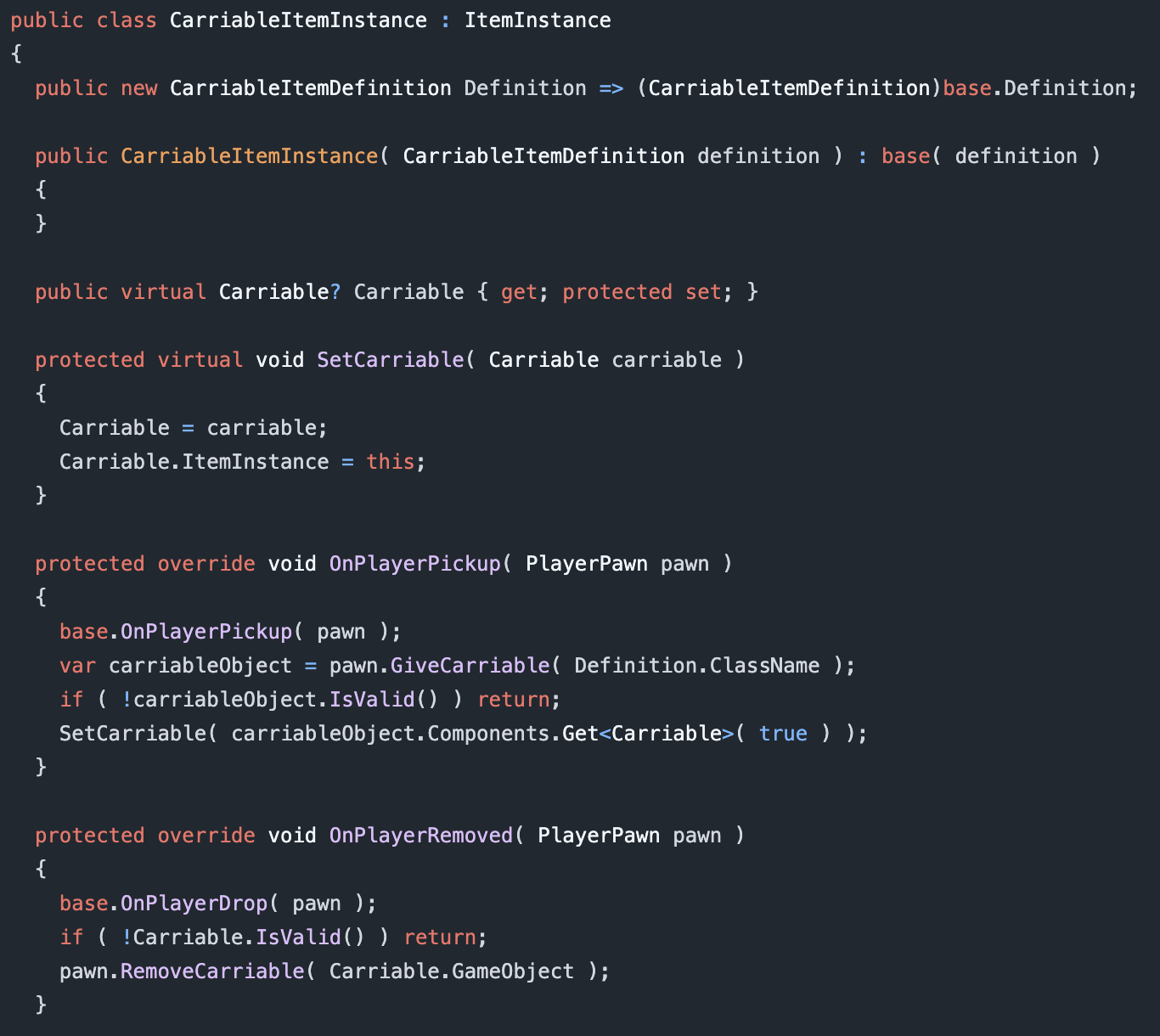
pawn.GiveCarriable is a helper function which essentially;
- Creates the carriable game object
- Parents it to the player’s pawn
While pawn.RemoveCarriable does the inverse
Meanwhile our “Carriable Object” also gains a reference via Carriable.ItemInstance back to the CarriableItemInstance that it is representing.
Represent is the key word here.
Keep in mind that all of these are abstract concepts, that we are using these things to represent them.
The Carriable Object represents the Item Instance in the game world.
World Item (Component)
While everything else we’ve talked about has just been some class/object, World Item is the first actual component we’ve created.
World Item solves the problem of “How do we represent an item when a player drops the item from their inventory into the world, or there exists an item somwhere in the world for a player to pick up”
We are tying the abstract concept of an “Item Instance” to a physical object in the world. This is similar to the Carriable Object we were referring to before, but the major difference is a World Item can be picked up by a player, while a Carriable Object was a physical representation of an item in a player’s possesion.
Therefore we can imagine that the World Item has some sort of method on it that the Player will call to “pick up the item”
This is already a code heavy post so how about we look at the code here too;
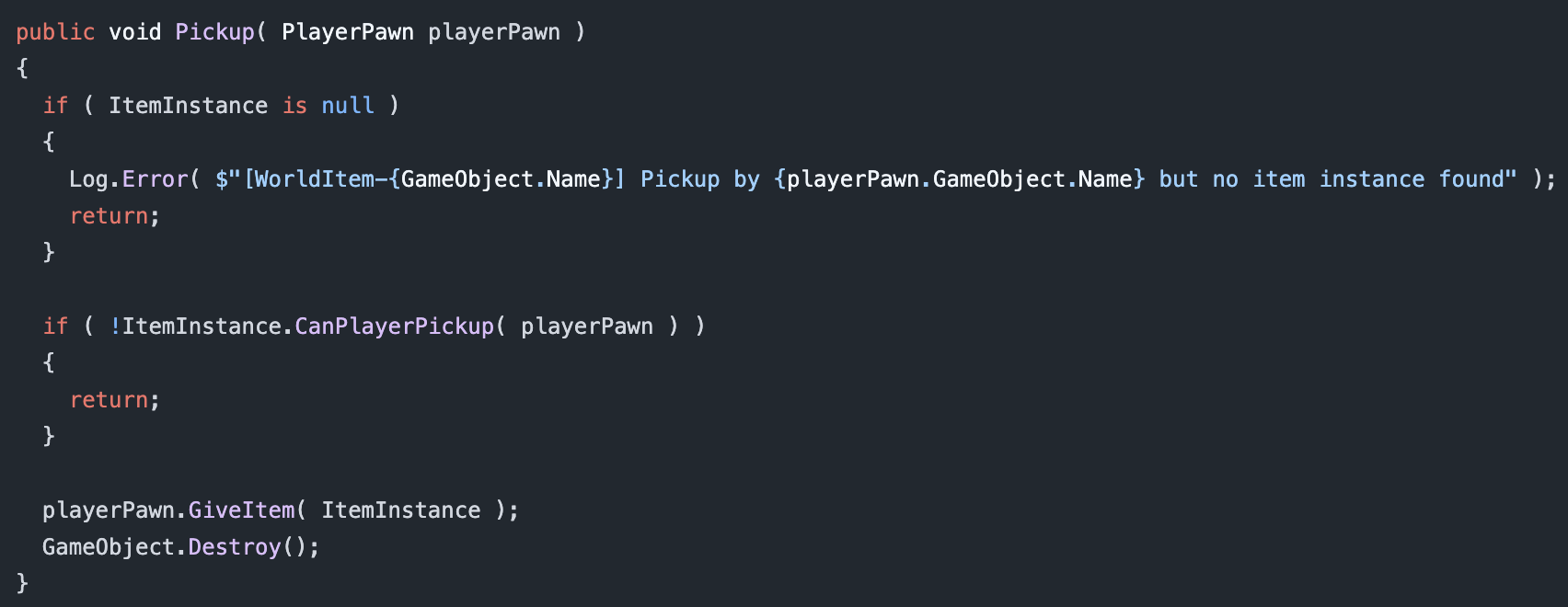
This Pickup method (on WorldItem) is called by a player pawn when a player looks at a gameobject that has a WorldItem component, and presses their “Pickup Item” key.
We can see that we verify that our WorldItem has a valid ItemInstance associated with it, and if it does, it “gives the item” to the player and then destroys the game object.
Thus the player has the item and the “physical representation” of the item is destroyed.
playerPawn.GiveItem adds the ItemInstance to the player’s inventory, you can think of their inventory as a list of ItemInstance’s and then calls functions like “OnPlayerPickup” on the ItemInstance.
If our ItemInstance happens to be a CarriableItemInstance it calls that OnPlayerPickup we saw earlier which results in a “Carriable Game Object” being created and parented to the player’s pawn.
I’ve said “Carriable Game Object” a little loosey goosey this post. When I say “Carriable Game Object” i mean “A game object which has a Carriable component and whatever else it needs” or “A game object that is represents a carriable thing, whether that thing is a gun, medkit, etc.”
Item Manager
The last piece of the puzzle.
The Item Manager is a singleton component that “manages” all Item Instances in our game. By manages it really just keeps a big list of them and makes sure no funny business is happening.
Since Morbus is a multiplayer game we need to make sure that all players are aware of all items that exist. Our manager solves this by telling all players whenever an item is created or removed.
Bonus Component – World Item Placement
In Morbus we need to seed the map with weapons, and so being able to visually place them would be ideal.
It would also suck to place a bunch of items, and then later need to change the prefab or the game object that is these items. We’ve also discussed how every WorldItem needs an ItemInstance, but when the scene loads there are no ItemInstances created yet.
Thus we have a World Item Placement component.
When the scene is first loaded, this component will
- Create an ItemInstance based on a given Item Class Name
- Create a “World Item Game Object”
- This is a game object with the World Item Component
- A model renderer to represent the item
- And everything else it needs (like a collider)
When choosing the Item Class Name for a placement we can either give it a single value, thus garunteeing it will always be that type of item. Alternatively, we can give it a weighted list of class names, thus allowing us to make the item random.
Things to Improve
Right now there’s nothing that makes sure that an ItemInstance doesn’t exist in two places at once. This isn’t required at the moment but as complexity increases it will help prevent bugs. Solving this would be pretty simple, creating a lock on an item that must be unlocked by the user/consumer, or just having some sort of location id tracker to verify that when an item is moving from one place to another the request isn’t outdated.
Item creation is also P2P right now, so any client could create an item and send it along the network. Cheaters will love this. A simple fix is making Item creation host authoritative and making sure whenever an item is created it happens for a valid reason. We’ll deal with the possibility of cheaters later.
Overall
It’s a simple system and I like it. Here’s a demo of it in game;
In the demo we can see
- Placing items in the world
- Helper buttons that will move the item to be resting on a surface
- Changing the type of item that will be spawned
- Seeing the randomness
- And then picking up items
There’s also a bonus thing that I did with items in Morbus which is making it so a player can hold the world item in their hands without actually putting it in the players inventory.
Leave a Reply